Bruce Schneier | |||||||||||
Schneier on SecurityA blog covering security and security technology. « Mafia Boss Secures His Data with Caesar Cipher | Main | RFID Cards and Man-in-the-Middle Attacks » April 24, 2006Microsoft Vista's Endless Security WarningsPaul Thurrott has posted an excellent essay on the problems with Windows Vista. Most interesting to me is how they implement UAP (User Account Protection): Modern operating systems like Linux and Mac OS X operate under a security model where even administrative users don't get full access to certain features unless they provide an in-place logon before performing any task that might harm the system. This type of security model protects users from themselves, and it is something that Microsoft should have added to Windows years and years ago. The problem with lots of warning dialog boxes is that they don't provide security. Users stop reading them. They think of them as annoyances, as an extra click required to get a feature to work. Clicking through gets embedded into muscle memory, and when it actually matters the user won't even realize it. Jeff Atwood says the same thing: The problem with the Security Through Endless Warning Dialogs school of thought is that it doesn't work. All those earnest warning dialogs eventually blend together into a giant "click here to get work done" button that nobody bothers to read any more. The operating system cries wolf so much that when a real wolf-- in the form of a virus or malware-- rolls around, you'll mindlessly allow it access to whatever it wants, just out of habit. Then there are the security dialogs. Ah yes, now we're making progress: Ask users on EVERY program you launch that isn't signed whether they want to elevate permissions. Uh huh, this is going to work REAL WELL. We know how well that worked with unsigned ActiveX controls in Internet Explorer so well that even Microsoft isn't signing most of its own ActiveX controls. Give too many warnings that are not quite reasonable and people will never read the dialogs and just click them anyway… I know I started doing that in the short use I've had on Vista. These dialog boxes are not security for the user, they're CYA security from the user. When some piece of malware trashes your system, Microsoft can say: "You gave the program permission to do that; it's not our fault." Warning dialog boxes are only effective if the user has the ability to make intelligent decisions about the warnings. If the user cannot do that, they're just annoyances. And they're annoyances that don't improve security. EDITED TO ADD (5/8): Commentary. Posted on April 24, 2006 at 1:43 PM • 101 Comments To receive these entries once a month by e-mail, sign up for the Crypto-Gram Newsletter. Durable Alloy • April 24, 2006 1:58 PM "...even Microsoft isn't signing most of its own ActiveX controls." Not true. Microsoft does digitally sign every bit of executable code they ship, in one way or another. Not that it really matters to end-users, anyway. Skail • April 24, 2006 2:08 PM I have to wonder if anyone at microsoft actually USES windows? If there are such people, they must not have any say as to what 'features' go in. nog • April 24, 2006 2:11 PM Paul Thurrott's description does indeed sound hideous, but let's not forget that Vista is not yet in Beta 2. Microsoft has a long history of changing UI at the last possible moment. In other words, there's plenty of time to screw it up even more... Erik • April 24, 2006 2:11 PM As has been often said: "Those who fail to learn UNIX are condemned to re-invent it. Poorly." 1915bond • April 24, 2006 2:14 PM "Warning dialog boxes are only effective if the user has the ability to make intelligent decisions about the warnings. If the user cannot do that, they're just annoyances. And they're annoyances that don't improve security." 90% of the users I deal with (users heavily infected with malware) say they click "Yes" to everything and don't even bother to read the dialog in the box. Same issue applies to process sentry applications like ProcessGuard and personal firewalls - the apps are only as functional as the user with the choice. kashmarek • April 24, 2006 2:16 PM And, just what did you expect? Something better?? From Microsoft??? And for a small (?) price, Microsoft will sell you security services to do it even faster. Magnus Nordlander • April 24, 2006 2:20 PM Windows Vista... What's there to say about it? Microsoft's latest attempt to squeeze money from people using just eye candy. I find it laughable. Although if what I've heard is true they're moving a lot of drivers out from kernel mode to user mode, which will if it is true make the system more secure by design, but combined with millions of annoying warning dialogs the real world effect will probably be that Vista will actually be less secure. It actually gets worse. In his review of the latest build, Thurrott points out that Microsoft security people found a bug in the original that spoofed the cursor. It hid the real cursor under a fake one and when the user clicked it thinking that they were canceling a screen, they were actually accepting it thereby allowing malware to install. In order to combat this, Microsoft currently has the dialog boxes pop up in the Secure Desktop mode, meaning everything goes black except the dialog box thereby preventing the user from doing anything else until the dialog box is addressed. Imagine that happening over and over again. mastefuol • April 24, 2006 2:43 PM I dont run a virus scanner and I have only 'caught' two PC virii ever: I perpetuated the Melissa virus because I had inadvertantly trained myself to click away the frequent 'macro security' warnings in M$ Office apps. The other was the Slammer worm, but thats another story :p Rob Napier • April 24, 2006 2:50 PM "thus ensuring that the user understands what they're doing before making a critical mistake." Not exactly. Even in KDE and OS X, all these password prompts do is to ensure that the user types his password before making a critical mistake. No understanding is required, and the messages can often obscure understanding even for a technically sophisticated user, as the rest of this article points out. To those who blame the user for making poor decisions in the face of useless and confusing information, do you carefully read and consider every document and agreement you sign as part of daily life? Do you carefully consider the warnings printed on nearly every product you use and make informed risk tradeoffs? How can we expect computer users to treat warnings about risks to their computer any more seriously or accurately than we treat warnings about risks to our lives? Nick Lancaster • April 24, 2006 2:52 PM This is nothing new - Windows has always been lousy at implementing notification boxes. If I'm on the Mac OS and a dialog box comes up from another application, it patiently sits there waiting for my attention. In Windows, I'd be working in Word, a new e-mail would come in, the dialogue box would pop up and go active, and my next carriage return in Word would open the piece of mail. Preston L. Bannister • April 24, 2006 3:08 PM An observation about warning dialogs (from self-checkout). Tonight was a classic example. A mother was at the self-checkout with her two young daughters. The older daughter was handing items to her mother to scan, and was clearly less intimidated by anything with a screen. The mother would scan the item, place it in the bag, and the younger daughter would take the bags and place them in the cart. All perfectly reasonable. But when a bag was removed the screen would present a complaint. Now though I knew why the complaint appeared (the software was counting on the ever-increasing weight of the bag to monitor the checkout process), even I found the message presented somewhat obscure. The mother was plainly puzzled by the opaque message. The older daughter had learned that when computers present obscure messages, the best response is to punch buttons until the message goes away. In the end the daughter’s stategy worked. At points the software threw up full-screen messages with the demand that we should all wait for a clerk to appear. The nearby clerks did not seem in any way interested. The older daughter knew better and simply kept punching buttons, the mother kept scanning items, and the younger daughter kept loading bags into the cart. Now I have no idea if the final total was accurate, but in the end they paid and left. An older male standing behind me was plainly trying to make sense of all that was going on, and was just as plainly puzzled. He turned to his daughter (or grand-daughter?) and muttered something about “labor-saving��? devices and Wal-Mart saving the price of a clerk. From the above we can see pretty clearly why ActiveX controls were an enormous security problem in Internet Explorer :) . mpd • April 24, 2006 3:27 PM "I dont run a virus scanner and I have only 'caught' two PC virii ever" How do you know you've only ever caught two viruses? derf • April 24, 2006 3:33 PM This isn't a problem of providing too much or too little information to the user. It IS a problem of providing too many false positive threat warnings so that any real threat is lost amidst the noise or dismissed as yet another falsehood. To be truly meaningful, any system has to eliminate the overwhelming majority of false positives. Creating a database of "accepted" programs is open to too much abuse, so I'm not sure how MicroSoft will extricate Vista from this pickle. Pat Cahalan • April 24, 2006 3:39 PM The "treat Administrator's as normal users" Security Options setting (from Atwood's blog) kills me. Now, not only will I have to solve problems for relatives and friends over the phone, but I'll have to guide them through another labrynth just to find out what their permission set *really* is. I cannot for the life of me understand why Windows has yet to adopt a simple "sudo" arrangement. Click on an executable? Prompt once -> run as "yourself", or run as "higher permissions account" [enter password]. Prompting for each individual action is just plain crazy. It makes sense to have the additional step provided by a sudo-like functionality (anyone can make a typo or click on the wrong icon), but verifying each individual action? Joe Patterson • April 24, 2006 3:44 PM @preston Interesting... I've seen a very different system at places with automatic checkouts. They pop up a warning, and you can't do *anything* until you place the items back in the "bagging area". I've also seen this system DOS'd frighteningly effectively by someone who got frustrated and took their stuff and walked away. They had 3 clerks sitting there trying to figure out how much weight they had to put in the bagging area to convince the machine that the right amount was there so that they could log in and cancel the transaction. That's bad design too. Maybe it was a precursor to Vista! ACoupleofPoints • April 24, 2006 3:44 PM I am not defending Microsoft, but beyond the typical Microsoft bashing, I think there are a couple of points here. 1) Vista is still in beta, so noone knows what the shipping product will do wrt UI. 2) Paul was operating in user mode, which is still a "work-around" for lazy people. My understanding is that if he had logged in as an admin user account to install the software, he wouldn't have gotten so many messages when performing each admin level operation. 3) The program he installed was broken. Why should he have needed to deleted those shortcuts in the first place. The application should never have placed shortcuts on the user's desktop by default. 4) Regarding the comment on other applications and Microsoft's usage. I expect that Microsoft's users are using applications that were written properly. Most Windows users run into problems as a result of lazy third party programmers/companies that don't bother to write good software. They simply require admin level access for even the most basic operation that don't require it - plain and simple - lazzzy. 5) Windows has been secure since Windows 2000. If users simply ran as LUA in Windows XP, most of their security problems would go away. However, their problems would shift to finding all the poorly written applications by lazy programmers that unnecessarily require admin level access. David • April 24, 2006 3:53 PM Isn't some of this "security" old fashoned FUD in disguise? I mean, every time you install something not signed by Microsoft you get a "security" message? John Doe will get the message loud and clear: Don't buy anything not from Microsoft. Bruce is also right when he points out that it's also a CYA on Microsoft's part, but it's also a CYA on another topic: Revenue.... penwize • April 24, 2006 4:05 PM This article seems to get right to the heart of M$'s problems - no architects managing use cases, workflow, or defining functionality. Everything they do appears to be the product of "product managers" deriving "functional requirements" from "end users", i.e. the people that can't program their VCR's. If they keep this up while Apple and Linux continue to make progress then they’re going to loose their technical user base before too long. It’s getting to the point that it’s just not worth all the trouble anymore. (I’m a software architect that uses M$ products daily, including XPe, so I do have some idea what I’m talking about.) lala • April 24, 2006 4:05 PM I recently started to use Tiny Firewall 2005, and I am pretty inpressed by the Host Security Engine. You have choices like: - This program can run once 1915bond • April 24, 2006 4:21 PM @lala Are those all of the choices, a select few, the most important choices? How about adding: See the problem with choices? Pat Cahalan • April 24, 2006 4:43 PM @ ACoupleOfPoints > 1) Vista is still in beta True > 2) Paul was operating in user mode, which is still a "work-around" for lazy I don't know if this is true or not (operating in user mode) as he doesn't say. But regardless, most users should be working in "user mode". The complaint is still valid. > 3) The program he installed was broken. Why should he have needed to Deleting unnecessary shortcuts is hardly the definition of "broken". Certainly, the installer should prompt for this sort of UI question, but this is cosmetic and not the default behavior for a great number of software products, including Microsoft Office (Outlook icon on the desktop, anyone?) > 4) I expect that Microsoft's users are using applications that were written I actually expect that most of any OS's users are using applications that were written improperly. If they weren't, CERT would be out of business. > Most Windows users run into problems as a result of lazy third party This is partially true, but the Windows privilidge classes (Users, Power Users, Administrators, Debug Users, Partridge In A Pear Tree) are rather improperly documented and the distinctions between classes are blurred. I agree that a large quantity of MS-compatible software is written poorly, but this is as much Microsoft's fault as it is the various third party developers'. > 5) Windows has been secure since Windows 2000. If users simply ran as This is not only flatly untrue, it is also patently absurd. Install a Windows 2000 box (or an XP-pre-SP1) box off CD and plug it into the public internet. Stir. Wait 1 or 2 hours for the dough to rise. You now have a hacked box serving out warez. The RPC/DCOM vulnerability and the resulting worm storm lowered the life expectancy of an unpatched Windows machine on the public internet to 15 or 20 minutes. There were cases here on campus where a machine would literally be infected *during the installation process* if it was connected to a live port during installation. Magnus Nordlander • April 24, 2006 5:01 PM @ACoupleOfPoints >5) Windows has been secure since Windows This is simply not true. Windows 2000 has a huge problem with it's security model. For some reason even something as simple as a driver to allow a program to communicate with a parallell port has to be a ring 0 driver, which is just plain stupid. In fact almost all drivers has to be ring 0 drivers. And something that you touch upon is that many programmers are bad programmers. So consider the following. Ring 0 drivers are trusted. Therefore a bug in a Ring 0 driver can compromise the system. Most drivers has to be in ring 0. Most code have bugs, code produced by bad programmers probably has more bugs. You probably have a lot of ring 0 drivers. There is a good chance that at least a couple of these drivers has some bugs. There is also a good chance that at least one of these bugs will compromise your system. As you might see this can be (and is) a problem. Chase Venters • April 24, 2006 5:17 PM @Magnus You realize this is true for non-microkernel systems, right? Drivers have to run in ring 0. Tough. There used to be a push to turn drivers into user-space (ring 1-3) programs, but people turned back around towards ring 0 because the performance really sucked, and because running in ring 3 still doesn't totally protect you anyway. (Something talking to hardware from ring 3 can still tend to hang the machine, etc) The problem, I suspect, is that Windows is a huge closed source platform and lots of people who are getting paid to just do enough to get by end up writing your kernel code. Magnus Nordlander • April 24, 2006 5:25 PM @Chase >The problem, I suspect, is that Windows is a huge True indeed. Chase Venters • April 24, 2006 5:32 PM @Magnus Interesting. Now, I think there's some class of drivers that are probably fine in user mode (say, most USB peripheral drivers). The problem isn't so much moving from ring 0 to 3 or vice versa as it is what that implies about your design. If your driver is ring 3, then you're basically saying "this guy can't access kernel memory." If that's true, he's going to need his own memory, which means you are going to be doing context switches w/TLB flushing in order to move in and out of the driver code. That's going to have a huge impact on performance. (Perhaps Microsoft will leave network and video drivers in kernel space? Perhaps most developers will ignore them anyway...) Magnus Nordlander • April 24, 2006 5:49 PM @Chase Microsoft actually specifies that "For example, drivers for input, display, and most network and storage devices cannot be migrated to user mode because they have kernel-mode clients." eric • April 24, 2006 5:55 PM I think it would be an interesting story for someone to describe the range of actions that are possible *without* getting a warning. That is, what is Microsoft's sense of safe computing? Durable Alloy • April 24, 2006 5:57 PM "5) Windows has been secure since Windows 2000. If users simply ran as LUA in Windows XP, most of their security problems would go away. However, their problems would shift to finding all the poorly written applications by lazy programmers that unnecessarily require admin level access." And many of those apps are included the OS as well. Try changing the date/time in an XP box without admin privileges. Chase Venters • April 24, 2006 6:15 PM @Durable Alloy Just a small remark -- requiring administrator privileges for date/time is normal, since the wall clock epoch is influential to the behavior of lots and lots of applications. Stig • April 24, 2006 6:19 PM > 2) Paul was operating in user mode, which is still a "work-around" for lazy people. According to a Microsoft briefing I was at not too long ago, UAP means that when you login as an admin you run as a normal user, but when you do something only an admin is allowed to do you are prompted for a password. They also indicated this behavior could be disabled. My guess - Microsoft will leave the feature as is, but disable it by default -- instead of improving the implementation. bruce... i've said it before and i'll say it again: unitil your blog offers solutions and not just excerpts from the web, it sucks... anyone can be an "expert" if by definition all that is required is saying that other peoples' ideas suck... be smart and live up to your rep.... i dare you!!
Mike • April 24, 2006 6:36 PM While I agree that these warnings are a problem, I don't think it is correct to single out Microsoft as many posters have done. This gets to the heart of a fundamental problem with computer security: users desire the freedom to do anything they want with the system, but they can't be trusted to have that power. This is a problem that no system has solved. People going off about UNIX are way off. Even UNIX (and UNIX-like) systems which are targetted for desktop use face this same issue. If you try to take a priveledged action in OS X or on a Linux desktop, it will open a dialog asking for your administrator password. If you do this enough, you will simply be trained to enter your administrator password. This is even worse than the simple "yes/no" dialog, because it means that someone who spoofs the password entry can easily get your root password and gain full control of your system. People have been screaming at MS to implement this sort of thing for years, because of the problems XP faced when granting users Admin access by default (note that it was perfectly capable of limiting users, but many programs would have problems running so MS set the default for new users to have full admin access). Some of us have known all along that this wouldn't really solve any problems, and now that people are seeing the betas apparently it is starting to sink in. Asking the user to authenticate what they want to do isn't going to solve the problem of the user doing something stupid and getting his/her machine infected. masterfuol • April 24, 2006 7:33 PM @mpd "How do you know you've only ever caught two viruses?" Of course I cant know for sure but I live by "Dont allow any code to execute that you dont trust." Its surprising effective. It also helps if you are borderline OCD intimate with your system. Reinier Zwitserloot • April 24, 2006 7:33 PM Crying wolf too often is obviously a bad plan, but even with moderation, such dialog boxes become 'muscle memory' very quickly. Simple example: The 'do you really want to delete item Foobar?' dialog box. Arguably its a good plan to offer some sort of confirmation when deleting stuff. In that case, however, it would be a far better idea to provide some sort of simple 'undo' feature. In my own experience, deleting the wrong stuff, I -always- click through the confirmation dialog box, and only then head to the trashcan to fish out the files are restore them. A simple cmd+Z/ctrl+Z would be a lot simpler. Doesn't exactly apply to allowing unsigned code to run or whatnot, but where possible, an undo feature is a good way to avoid the 'muscle memory' pitfall. Keep up the good work, Bruce! B-Con • April 24, 2006 7:44 PM One seriously has to wonder how Microsoft, of all financially blessed companies, can continuously make such obvious security mistakes. Have they no security consultants? Does Bill Gates not believe in expert review? Seriously, mistakes like this are pathetic. Deleting a file from one's desktop should not *require* confirmation. I delete so many files on such a consistant basis I've turned off delete confirmation in XP. If it turns out to be a mistake, that's what the Recycle Bin was for. Perhaps they will also ask for confirmation before performing similar dangerous actions, such as turning up the Windows volume control too high. Anonymous2402958485767.1 • April 24, 2006 7:56 PM I noticed that one of those dialog boxes had the option to automagically repeat the answer you choose. At least ignoring cries of wolf can be automated. Everybody is missing the point - Microsoft is trying to diversify into the sports equipment market and Vista is a finger muscle trainer. Magnus Nordlander • April 24, 2006 8:16 PM @B-Con The answer is simple. They get more profits from not having security consultants and expert reviews. If Gater, Ballmer et al. believed that it would increase profits, then you can be sure they would do it, and do it quickly. However, while it doesn't generate profits (in this case it most probably generates losses) no one will do this. A company's sole purpose is to generate profits for it's share holders. rhandir • April 24, 2006 8:23 PM @Chase Venters & @Durable Alloy Durable Alloy wrote: [quote] Chase wrote: [quote] You are both right: its a bug no matter how its implemented, since windows combines the way time is displayed with how time is measured in windows. Users need to change the _apparent_ system clock in order for things like calendaring and local-time relevant events (autostart, etc) to work right. They should be able to do that at will, and settings should follow the user. The system needs a stable epoch* to count from in order to figure out when files were created, etc. - that needs to be protected from casual tinkering. Administrator privleges are perfectly appropriate. Many problems occur in software that expects a constant date setup, when the user needs to work in multiple time zones and account for changing DST rules. If DST rules are involked _as an interpretation_ made by context (user, place, season, etc.) we could get much better results. We expect to be able to right click in the lower right hand corner on the clock in order to tinker with how time is displayed at will. It is a basic UI expectation: changing the time on my watch doesn't change the date on my calendar, or reset the atomic clock at the greenwich observatory. Frankly, this is the second most annoying bug in any OS, after the focus stealing bug. (Which has genuine security implications.) -r. *in unix-like systems, the epoch is the arbitrary date in the 1970's that the OS counts the seconds since. p.s. Bruce, the UI for the blog could benefit from allowing users to use or or something. It's no big, but it would be nice. Rob Funk • April 24, 2006 8:36 PM It's not just Microsoft..... Reading this article I couldn't help being reminded of my experiences with KDE 3.1 (which I use all the time and generally like), where I all too often get dialogs that don't give me enough information to make a good decision, such as asking if I want to trust "this site" or "this server" without being told what site, what server, or anything more about them. experience • April 24, 2006 9:00 PM Incompetance and arrogance often spring from the same source, for the same reason. Chase Venters • April 24, 2006 9:05 PM @Mike But UNIX (Linux) does do a far better job here, and while I'll grant that it's not perfect, it demonstrates what is possible. One of the biggest complaints I have about Windows is the software installation process. Every program loves to adopt its own installer, and then the norm is for every installer to ask you if you want to read README (who does?) or if you want to install desktop shortcuts (for every program?) or if you want to modify your file associations (perhaps). And god help you if you want to uninstall... Why is it acceptable to throw all these questions in the user's face? Why not adopt a sensible default behavior, and allow people to customize? This is something I really like about my KDE / Linux desktop: when I want a piece of software, I type "emerge name-of-software". All software is managed by this packaging system (Portage). If it's a GUI application, one or few sensibly-named and placed "K" menu entries will appear in the appropriate folder. (And unlike Windows, not every program makes itself a "root-level" subfolder just for itself, its uninstaller and README file. Rather, they organize nicely into categories like Graphics, Internet, etc). If I want to relocate the application shortcut, or make a shortcut on my desktop, there's an easy way for me to do that, and it doesn't involve asking some foreign application to do it for me. Privilege separation in UNIX is standard; in Windows it's bolt-on. Because UNIX was always this way, any application that needs "root" needlessly is harshly criticized (and often quickly fixed). In Windows, they've got an entire armada of lazy and clueless third party developers that just don't care, but they're a force to be reckoned with because users _need_ their applications. According to what I've just read, Microsoft *has* done very badly here, because they have a vastly distorted picture of what a "privileged operation" should be. Local user settings should be capable of manipulation by said local user sans asking them for the password. The purpose of asking for administrator credentials is for something like installing a program that requires system-level modifications. And for god sakes, why doesn't Windows have the concept of an execute bit? This simple piece of the UNIX model stops an entire class of social engineering attacks Windows is highly vulnerable to. When I follow the news on where the operating systems are heading, I see Microsoft continuing to demonstrate what they can do wrong (endorsing malware scanners as an appropriate solution to the problem of unauthorized software running on the computer is insane when the predominant source of the problem is ignored), and I see Linux continuing to demonstrate sense and sensibility. I think it's only a matter of time before the Linux desktop stack is _commonly_ armored with technologies like PaX and SELinux (some distributions already are), and the further it goes in this direction the more apparent all of Microsoft's many mistakes will appear. Linux isn't a silver bullet in end-user security, but it's built on sensible technology and usually achieves very sensible results. And it's got more than just potential to protect clueless users from themselves. Anonymous • April 24, 2006 9:31 PM Alec, as for Bruce's suggestions: Clearly from this, there are two options: The former is quite impractical; people aren't good at making security decisions. The latter is quite impractical; it'd be very expensive. So, we could try making it easy for people to differentiate levels of warning, and write pertinent messages for each. That'd be a good beginning. Still, I doubt anyone would read them, no matter how blatant and understandable they are. Duncan • April 24, 2006 9:40 PM What about a capabilities-based system? http://en.wikipedia.org/wiki/Capabilities Anonymous • April 24, 2006 10:15 PM This is amazing. I have a book about GUI design written in 1995 that explains why warning dialogs are entirely useless (it's basically been covered here), but here we see Microsoft using a series of them, marching on and on and wasting the user's time, as if they solve everyone's problems. I can only conclude that Schneier is right; this "security" is meant to absolve Microsoft of responsibility for their ineptitude and sloth, and nothing more. ACoupleofPoints • April 24, 2006 10:37 PM @Pat "Deleting unnecessary shortcuts is hardly the definition of "broken". Certainly, the installer should prompt for this sort of UI question, but this is cosmetic and not the default behavior for a great number of software products, including Microsoft Office (Outlook icon on the desktop, anyone?)" It is not just unnecessary shortcuts, but also how they are installed. Many lazy programmers install desktop icons into the default user context (accessible to all users and which requires admin level) instead of the current user context. In the Microsoft Office example you give, this can be seen when logging in as a user that hasn't yet installed Office into that context, the Office installer runs to setup for that user. Lazy programmers install programs into the default user context, which is a poor design shortcut. @Durable The system time should only be changed by admin level access. Otherwise, there is no sense of trusted/stable time for the computer. I have been using computers for many years now and don't ever remember having a need to "tinker" with the system clock. However, if one needs to have user level "clock tinkering" then I agree with the poster that one possible solution would be a "system time" that is only accessible as admin. Then have a "user context" time that users can tinker with that only affects those applications started by that user and running in that user's current context/login session. However, I could see where this could easily get confusing for the novice unless they clearly understood the difference between the two time values and what affect the different time values had on different events occuring in the user's session (i.e. system events would use one time, where user events would use a different time, yikes!). @ACoupleofPoints "Many lazy programmers install desktop icons into the default user context (accessible to all users and which requires admin level) instead of the current user context." Ironically, the problem that Chase pointed out is exacerbated by the number of available installation packages. Ka-Ping Yee • April 24, 2006 11:44 PM The answer is security by designation, not by admonition! User actions should be unified with authorization, rather than adding a separate authorization step to each action. For a more thorough explanation of this concept, see http://zesty.ca/pubs/yee-sid-ieeesp2004.pdf . Mike • April 25, 2006 12:07 AM > 5) Windows has been secure since Windows 2000. LOL, who let the comedian into the building?? Really, that statement is one of the funniest and most blatantly UNTRUE things I've ever heard, I actually laughed out loud when I read that. Thanks for the chuckle! Davi Ottenheimer • April 25, 2006 12:13 AM Well, I say that the dialog boxes have nothing to do with security of Vista as no one with any security sense would have recommended them or allowed them to be there. With that in mind, anyone want to bet this is all due to some eager marketing or GUI VP at Microsoft who thought that monetization of popups on the web should be attempted on the desktop. That means the beta warnings are really a peek into Microsoft's new revenue project. They'll reduce license costs and make you click through thousands of popups "warnings" (ads), which will all be tied into analytics to generate a personalized (spam-full) user experience. For lack of a better phrase, it seems the security folks still don't wear the pants in the Microsoft family or they would have killed excessive warnings before the project made it out of the design phase... Brew-ha-ha-ha! lala • April 25, 2006 12:55 AM @1915bond I don't see your point. I cited the choices from memory, but they make sense to me: - This program can run once Each time the program is launched, I get a pop-up, and I get a pop-up each time it modifies "dangerous" registry entries or system files. - This program can run whenever it wants Means its a program I use regularly. The firewall will still popup if the program tries to use the net or makes "dangerous" modifications to the system. - This program is an installer Basically means that the application is trusted to do whatever it wants for one run. With most firewall, an installer will generate tons of popups because it modifies a lot of files and registry entries, launches subprograms etc... - This program can use the network. Some people like medon't want any program like their word processor to access the net. Of course this were just examples, the firewall has "advanced settings". Why not test it instead of criticizing ? Christian Kaiser • April 25, 2006 1:49 AM "requiring administrator privileges for date/time is normal" Possibly (but inconvenient or an unnecessary restriction, as posted in another comment here). But you cannot even VIEW the clock, for example to see the seconds. Try doubleclicking the time in the tray as a normal user... Ch. Nocturn • April 25, 2006 2:40 AM @ACoupleofPoints I disagree with you on several points. "1) Vista is still in beta, so noone knows what the shipping product will do wrt UI." If this kind of big changes are still allowed in the BETA state, I think their development process is horribly broken. Remember that Vista only has 8 months out of 6 years left in development so if they do a major change still, it will not be tested properly by the time they release "2) Paul was operating in user mode, which is still a "work-around" for lazy people. My understanding is that if he had logged in as an admin user account to install the software, he wouldn't have gotten so many messages when performing each admin level operation." Logging in as an admin in a full session is a security risk, it makes it tempting to run IE for a quick download etc. "3) The program he installed was broken. Why should he have needed to deleted those shortcuts in the first place. The application should never have placed shortcuts on the user's desktop by default." If this were so, why did the system allow the creation of the files on the dekstop in the first place? "4) Third party apps" Yes and no. MS cannot verify the quality of third party apps. But in order for them to work on Vista, they could enforce a good set of security policies instead of accomodating broken programs "5) Windows has been secure since Windows 2000. If users simply ran as LUA in Windows XP" Off course, but this should have been made the default behaviour! A system in the hands of an end user relies greatly on secure defaults and this is the part were windows fails the most. Nocturn • April 25, 2006 2:52 AM @B-con "One seriously has to wonder how Microsoft, of all financially blessed companies, can continuously make such obvious security mistakes. Have they no security consultants? Does Bill Gates not believe in expert review? Seriously, mistakes like this are pathetic" Actually, it makes pretty much sense (not that it justifies the insecurity). MS is about making money, to do this they want to sell software. Their idea is that software has to be so easy even a todler can use it, so they design their system from that assumption. To make everything 'Just Work' however, it means sacrificing security. That is also why they disable most good security ideas they have by default, to not bother mom when installing a screensaver from hackers-are-us.com. I'm a moderator on a large Linux forum and this is the most heard complaint from windows switchers. They want everything to 'Just Work', without passwords or warnings, with default settings and everything open. Nocturn • April 25, 2006 2:55 AM @rhandir "The system needs a stable epoch* to count from in order to figure out when files were created, etc. - that needs to be protected from casual tinkering. Administrator privleges are perfectly appropriate." You can say that again. Seriously, this decision makes windows a nearly impossible platfrom to program time-accurate applications on without jumping through hoops. Nocturn • April 25, 2006 3:02 AM @ACoupleofPoints "The system time should only be changed by admin level access. Otherwise, there is no sense of trusted/stable time for the computer. I have been using computers for many years now and don't ever remember having a need to "tinker" with the system clock. However, if one needs to have user level "clock tinkering" then I agree with the poster that one possible solution would be a "system time" that is only accessible as admin. Then have a "user context" time that users can tinker with that only affects those applications started by that user and running in that user's current context/login session" I think what he meant (and I agree with) is that the system time should be maintained as a linear value in UTC. The user time shouldn't be a seperate clock, but an abstraction from the system time based on the time zone a user has selected. Unix has historicly implemented this and it solves so many problems that I cannot imagine anyone else not doing this. Erik N • April 25, 2006 3:20 AM So, now we know why Windows Vista is repeatedly delayed: Clicking through all the warnings is taking time from development... rm-rf *.* • April 25, 2006 4:11 AM I aliased rm to ´rm -i´. If I want to remove with wildcards I have to type /bin/rm, which makes me think hard whether I really want to remove. (A collegue suggested aliasing rm to `sudo rm -rf / ´, but that is a different story). Surely, something similar could be done with a GUI? Prompt unless you hold down a function key while dragging files to the trashcan? Christopher • April 25, 2006 4:24 AM Oh, great. My dad has enough problems with a file download box. dad: "err... what do I do now?" me: "click ok?!?" He's never gonna get anything done if he has to use vista :o\ Arturo Quirantes • April 25, 2006 5:19 AM So Microsoft has "invented" root accounts, admin privileges and the like. Wow! And only a few years ago they "invented" the recycle bin (Mac users, please turn your laughs off). What next? Command-line interpreters? Those guys "innovate" the same way some dress designers do ("inspired in the 40s" = "I just saw Casablanca again and I love how the girl dressed"). Anonymous • April 25, 2006 5:31 AM @Christian Kaiser Now that's dumb. I have to say, the KDE Control Centre has the right approach - if you look at a section that requires administrative priveleges (that is, you have to be root to modify it) and you're run it as a normal user, you can still view it, but you can't change anything. There's a button marked "Administrator Mode" - click it, and it prompts you for your root password, then enables the section. (I believe some behind-the-scenes magic is involved, but that's besides the point...) Clive Robinson • April 25, 2006 5:33 AM @ACoupleofPoints "5) Windows has been secure since Windows 2000. If users simply ran as LUA in Windows XP, most of their security problems would go away." Sorry that's not the case, a large number of apps reserve privaleges for themselves that the system allows. These privelages unfortunatly allow a knowledgable attacker to gain full access to the machine. Bruce posted to his blog a while ago a paper by some researchers that described an analysis engine they had designed that actually tracked the privelage within a program and showed how it was possible to find privelage escalation roots to the top... If I rmember correctly it used Adobe Reader as an example application. So it is known that an automated tool can be made, how long before J.D.Cracker makes his own? Thomas • April 25, 2006 6:10 AM Ooooh... that sound very similar to my personal firewall in the "learning" mode. It always asks me to allow or deny a process or program to do this or to access that... even if I do not really know what process this is or if this operation is essential. :-( By the way... it's not the Microsoft one I am talking about... but it's normally Microsoft processes that I am asked for. Clive Robinson • April 25, 2006 6:34 AM @Nocturn "The user time shouldn't be a seperate clock, but an abstraction from the system time based on the time zone a user has selected." People have real problems with time, they think relative to themselves not others, and they most certainly do not understand the spatial elements of time. The US is a clasic example of this where some admin posts that "The system will be taken down for maintanence at 1pm" or some such. Do they mean EST or UTC or what? When you are on an international help desk and a user askes you what time it's going down you start asking yourself questions like, 1, What time zone is the admin in The odds are you will not get it right and you will end up looking silly. So you get upset and try explaing to the admin that they are a klutz for not putting a TZ on the message and they think you are odd because everybody knows they are in King County Seattle... Also if you have ever worked on a help desk with international clients you get used to users saying that they did something "around 2 oclock", and they kind of get peaved when you ask them for it in GMT or UTC. Oh and don't ask users what the time is they think you are stupid unless you explain why then they think you are strange or alien or worse... Oh and before you think well UTC +- to local time forget it, try reading through an EMail header where the message has been sent from a user in one multinational company to a user in another multinational company and you get asked why it took so long... Just for fun talk to a bunch of computer forensics bods about time issues, you will need some time on your hands and some money to buy them some libation for their troubles... My point is that there is no solution to the TZ issue except by having every thing in GMT or UTC and forcing the users to accept it and make the mental adjustments themselves which they probably won't any way 8( Adam Lock • April 25, 2006 6:59 AM Concerning the deluge of warnings. My expectation is that Microsoft kept the warnings unlocked in this release, to test the system out. It seems likely that the final product would ship with a prebuilt database of trusted applications. Whether it will help security is open to debate, but the alternative is to do nothing. Assuming the warnings appeared infrequently and for dangerous operations, then they may have some merit. I know from my experience of using personal firewall software that it can be annoying when you get popups up asking to permit this or that software to connect to the internet, but once you've trained it, then it becomes quite nice. There are occasions where I *want* to deny a program the right to do something, (e.g. connect to the internet) and this is where such dialogs prove useful. Whether they're useful to normal users is debateable. But for power users - yes I'd like a switch that allows me to see them. "It seems likely that the final product would ship with a prebuilt database of trusted applications." And these trusted applications are of course made by Microsoft. This will drive more buyers to M$ products because "all other programs throw up warnings when I try to use them so they can't possibly be safe to use". Smart move by M$... Nocturn • April 25, 2006 8:53 AM @Clive "My point is that there is no solution to the TZ issue except by having every thing in GMT or UTC and forcing the users to accept it and make the mental adjustments themselves which they probably won't any way 8(" I know timezones can be a pain and it is not helped outside of a computer by people using the ambiguous 12 hour clock. But as far as computers are concerned, I think Unix nailed this one by keeping the internal clock in UTC and calculating the offset based on the time zone selected by the user. The lack of a linear internal clock on windows makes it very difficult to write scientific apps on it, it even makes the life of a sysadmin a nightmare... @Nocturn, others "Windows should have made it difficult to work under an admin account," Why should *any* operating system do this? "while providing something easy (sudo-like) to elevate permissions when needed WITHOUT logging out and in to a full session." Like the right-click->Run As... feature that's been available in Windows for over a decade? "But you cannot even VIEW the clock, for example to see the seconds. Try doubleclicking the time in the tray as a normal user..." WFM. You simply have to click through a warning that states you have insufficient privileges to *modify* the time/time. "So Microsoft has "invented" root accounts, admin privileges and the like." I don't see Microsoft making any such claim. It's not as through software design happens in a vacuum -- everyone borrows features from one another. shoobe01 • April 25, 2006 10:01 AM I've seen a couple of complaints about some unixy systems also popping up admin authorization, so you get accustomed to them. I disagree from (especially) my OSX experience: First, these tend to pop up only when doing something overtly system impacting, like messing with the control panel or installing something. Second, they almost invariably only pop up once for an action. I cannot remember two in a row, but just wanted to cover my bases if they do. Third, they almost always communicate that authorization is required BEFORE it is. A little lock icon is in the corner of all control panels, the installer message says you will need to authenticate, etc. Fourth, its not a button push. Its a typed password. That's harder, so normally I would say its bad, but its the only way to be secure (so as a user, I trust it). Plus its enough of a hurdle, I would not put up with five in a row. I want to know WHAT I am agreeing to before I type in a password for it. Five: so therefore if I get one out of the blue, when I was not expecting it, I am inclined to read it and find out what its for. Also, you can see this happening today. Go to any less than insanely computer savy friend with 2k or XP. Have them buy something online. IE will throw up lots of inscrutable boxes that people immediately become accustomed to agreeing to. Most people I know aren't savvy enough to disable their "show this on exiting a secure site" boxes, and so just become accustomed to pushing the button, repeatedly, to get anything to happen. Brandon • April 25, 2006 10:26 AM And how about all the cycles windows eats. Ug, you get same day service. michel • April 25, 2006 10:27 AM the thing is kde/gnome / os X dont ask "administrative access" everytime. they try to _minimize_ the need to access "root" (administrator) land. for example :
that mecanism is called "sudo". it's the same thing used in os X. --- the policykit software will manage authorization, the software will go in "root" (or another system user with specific rights) only for the _moment_ it has to and it will drop on it immediately after the job done.
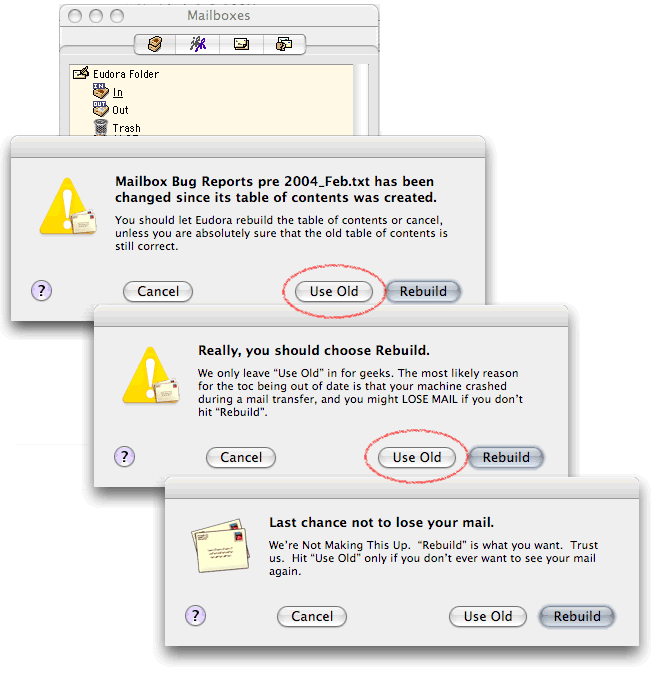
it's not perfect. because all the software is launched in the powered user, even the parts which don't need (for example the graphical interface). and maybe there are a bug in the software. the future is to help developpers to go in a "powered user" state only for the few functions needing it and drop of it after. it will help to minimize bugs which could do havoc. the goal is to avoid at all cost to launch user's programs as "root" and minimize the time the programs is working under an user with powers. they know to ask root access to everything just annoy user and is counter-productive works useful to improve unix/linux security : - apparmor (an novell project) darien • April 25, 2006 11:11 AM Reminds me of a series of warning dialogs I received in Eudora (email client) a few years ago. The primary difference being that the Eudora dialogs had both a sense of humor AND they provided real, useful decision-making information. Here's a screen capture. Quite funny. ACoupleofPoints • April 25, 2006 12:10 PM @Nocturn If this were so, why did the system allow the creation of the files on the dekstop in the first place? From Paul's description, the system did prompt him during the install, although, Paul's write-up focused on the prompts his removal of these files. The real issue here is that properly written applications won't display these security warning dialogs. Paul just happened to choose a bad application that was written by lazy programmers, plain and simple!
And these trusted applications are of course made by Microsoft. This will drive more buyers to M$ products because "all other programs throw up warnings when I try to use them so they can't possibly be safe to use". Smart move by M$... Exactly! I would welcome a database of certified and trusted applications. The code signing model was supposed to help with this, and did with signed macros, but too much responsibilty was put into developer hands (those lazy programmers again! :)). Microsoft should have required all applications to have been Microsoft certified and digitally signed by a Microsoft key. Anything less would be met with a wrath of security warnings. Vista is doing this now, but in a more round-about, albeit, more secure, manner. Microsoft is finally putting their foot down and sending a message to all those lazy programmers, telling them that if after all these years, they haven't yet correctly written their applications, then the "free ride" is over. derf • April 25, 2006 12:33 PM Guess I'll make a fortune if I write a program that automatically hits the "OK", "Accept", "Yes", "Finish", or "Next" button as soon as it comes up. Think how much time that program would save when working in windows... Mike • April 25, 2006 1:23 PM @Acoupleofpoints "Most Windows users run into problems as a result of lazy third party programmers/companies that don't bother to write good software." Like those lazy guys who programmed that Internet Explorer application? You know, the one that had a heap-based buffer overflow error that allowed arbitrary code execution and was a critical remote exploit for close to 7 weeks before MS issued a fix? Yeah, people should really uninstall that kinda crap.... MS isn't soley to blame, but they sure as hell aen't the inocent victim you and other are making them out to be. Jutta • April 25, 2006 1:26 PM Some people like me don't want any program like their word processor to access the net. Why? So you can't quickly access clipart, get needed templates, get help, find information--from inside Word without having to minimize and crank up a browser? Or so it can let you know about updates available... I think the whole system needs to be rethought out. We are at a crossroads. Many wonderful things are possible and easily accessible on the web--as well as dangerous, malicious things that break our computers and waste our time. And systems other than Windows aren't that immune either--don't kid yourselves... Perhaps the answer is that most programs that we want to use should be web based--where the actual program doesn't even reside on the hard drive. No registry changes necessary, no need for deciding which level of user is using the machine--what a ridiculous concept anyway---I should fill my harddrive with 20 of the same programs/settings/updates if I have 20 users? Peter da Silva • April 25, 2006 2:41 PM Apple is getting this "dialogs are security" problem as well. Go down to the June 2005 update in my link for one of the more obnoxious results of this stupidity. Authorization dialogs only improve security if they're (a) rare, and (b) the result of a deliberate request by the user, not an indirect side-effect of some earlier operation. That means, first, that things like deleting a file, emptying the trash, displaying a document, should not involve authorization dialogs. Error dialogs, yes, but something that the user does all the time should normally work... otherwise you're training them to approve all authorization requests. Second: if the application can't determine the security consequences of an operation when the user operates a control, then it shouldn't ask the user about potentially insecure operations later on. They should either be accepted, or they should fail... and produce an error dialog if anything. If there's a potential for performing a dangerous operation (like loading an ActiveX control in IE, or opening a downloaded file in Safari) then the application should be redesigned so that dangerous operation is explicitly requested by the user, or that it's not necessary. For example, the browser might present the user with a notice that they need to download and install a plugin to view a control, or it might have a set of "secure" applications for viewing potentially untrusted files. ActiveX and its parallels in DotNET. Browsers sharing desktop application bindings. Automatic installers. All these things are used as reasons for authorization dialogs, and the fact is that none of them are necessary and none of them are worth the security cost. Back them all out (whether it's Microsoft and IE, Apple and Safari, Mozilla and Firefox, everyone seems to have caught the bad meme) and put up with occasional momentary inconvenience and occasionally noticable sandbox overhead. Stefan Wagner • April 25, 2006 10:52 PM "3) The program he installed was broken. ...The application should never have placed shortcuts on the user's desktop by default." I'm using windows rarely, but some installer give you the altenative to do a 'typical' or 'customized' installation. "Broken"! a) Because I don't need cliparts in a document. Nocturn • April 26, 2006 2:23 AM @eM "Why should *any* operating system do this?" Because what many users and even a lot of sysadmins do not realise is that if you log in as root/Administrator, you run every single program with that priviliege. IE is leaky enough as it is, let alone that you should be running it with elevated privileges. Secondly, when you install windows (at least home edition), it actually defaults to making the user an administrator, it says this is recommended. It's up to any OS to be as secure as possible out of the box while still be functional. Nocturn • April 26, 2006 2:31 AM @ACoupleofPoints "The real issue here is that properly written applications won't display these security warning dialogs. Paul just happened to choose a bad application that was written by lazy programmers, plain and simple!" The warning dialogs were popped up by Vista, not the application that placed the icons there. You can at the most say the the uninstaller should have cleaned them up, but in windows, that is rarely the case. So, yes, I still think Vista is to blame ACoupleofPoints • April 26, 2006 8:50 AM @Nocturn "The warning dialogs were popped up by Vista, not the application that placed the icons there." Ok, maybe my wording could have been more precise. How's this: The real issue here is that properly written applications won't cause the display of these security warning dialogs. The end result is the same. This is not a OS (Vista in this case) problem. The Vista OS presented the warning dialogs as a direct result of the application doing something it shouldn't (like trying to perform unnecessary admin level operations). Undozed • April 26, 2006 9:26 AM "Microsoft should have required all applications to have been Microsoft certified and digitally signed by a Microsoft key. Anything less would be met with a wrath of security warnings." Certain people will think that M$ must retain absolute control of all processes that can be made to run over the operating system that they market (like @ACoupleofPoints), and thus will advocate for a central M$ database of applications. If history has taught us anything, this DB would be buggy, very difficult to maintain, and horridly skewed according to M$ business interests. Other people, like me, would like to think that an operating system manufacturer should not be given the absolute power to determine what software can be run in their OS (at least without a shower of warnings that reduce its usability to nil). It may very well be that my motivators as a user and M$'s motivators as a monopoly are not aligned, and that it will be me who gets the shaft in the next virus outbreak, hostile takeover or DRM debacle. Thus, I would feel much more comfortable with a non M$-centric approach where other vendors or open source software writers can sign their own apps, and Vista just shuts up and accepts it. To be completely sure, I trust Mozilla/Firefox way more than Windows itself, IE or Sony records with free malware. cynic1 • April 26, 2006 10:15 AM My view of Microsoft products is that they are very well designed. It is just that the design is aimed at securing the near monopoly. From this angle a Microsoft piece of software must: Pat Cahalan • April 26, 2006 11:26 AM @ ACoupleOfPoints Just to turn your argument on your head -> you can say that a secure system is one where the OS enforces good behavior. If you allow lazy programmers to write software for your operating system, you're culpable. You can create all the rules and permission sets and ACLs that you want, but if you don't force application writers to use them properly, you've just written vaporware rulesets. In this sense, Vista is guilty because it allows your definition of "poorly written software" to be installed in the first place. Davi Ottenheimer • April 26, 2006 2:29 PM Shameless plug for my own blog, but I thought a post on the "paradox of warning" might be interesting to some: I refer to Gerald White's theory of how people find balance in risk and safety (homeostasis). Here's what he has to say on the subject, in a nutshell: "'A warning can only diminish danger as long as there is danger.' This is the paradox of warning. It sounds puzzling, but what it means is that warning signs can only make people behave more cautiously if they agree that their behaviour would probably have been more risky if they had not seen the warning sign." Design Pattern • April 27, 2006 9:56 AM Durable Alloy "Microsoft does digitally sign every bit of executable code they ship, in one way or another." Arturo Quirantes "So Microsoft has "invented" root accounts, admin privileges and the like. ... What next? Command-line interpreters?" Windows PowerShell RC1 (x86): http://www.microsoft.com/downloads/details.aspx?... Windows PowerShell RC1 (x64): John R. Campbell • April 27, 2006 10:53 AM It strikes me that these security pop-up dialogues are just an example of what happens when the number of "false positives" provides so much noise that the "system" (not just computer systems, consider security screening against poorly selected profiles) becomes unusable. Anonymous • April 28, 2006 12:05 AM > The real issue here is that properly written applications won't cause the display of these security warning dialogs. Never put any blame on yourself... Durable Alloy • April 28, 2006 11:51 AM @Design Pattern: I downloaded the PowerShell RC1 ZIP file. I opened it, extracted the MSI, and verified that it is digitally signed. What's your point? Anonymous • May 23, 2006 3:05 PM An "incredimail" is on screen everytime I begin the computer. It is an annoyance and perhaps may be causing me some electronic damage. call2biz.gxs • July 20, 2006 8:18 PM http://www.call2biz.com BobSingo • September 14, 2006 2:08 AM Microsoft lost me after the SBS version detected a linux samba server as the "second" SBS server, then proceeded to time out silently after 60 minutes, even after reoving the nic it did this so trust microsoft - not really. osisbs • December 11, 2006 9:50 AM Ask yourself why 80% of Microsoft engineers have iPods. siauderman • December 29, 2006 8:59 AM You know actually Windows DOES have an "execute bit". It's in every file's acl (access control list), as spelled out in the POSIX specification. Surprising that MS learned SOMETHING from the POSIX folks. The difference between Windows and Linux/other unices is that in UNIX modifying the acl takes the form of a simple chmod whereas in Windows it takes a whole lot of fiddling with some rather obscure and hard-to-get-to-appear dialogs (in vista a change in one of these results in even more appear-even-when-you-don't-want-them permission boxes). The basic command line syntax help for cacls (Windows equivalent of chmod) is about a man page long. I'd like to think there's supposed to be a difference between quick syntax help and a man page. Not to mention that using this tool in vista results in yet more irritating permission boxes which black out everything else, unlike UNIX where a simple sudo and password settle it all. And to top it all off I think the execute flag is set by default on new files, so just about anything with an exe extension can run. Provided you click on enough allow boxes, that is. Peter da Silva • March 28, 2007 12:01 PM In my 20 years as a network administrator, I never once had the same user come to me twice and say "Peter, I saved an attachment to the desktop and ran it and now I think I have a virus". yes, some people do this, but it only seems to take one lesson to teach them to not reflexively save and run files. I've frequently had people come to me and say "I clicked on a link (in mail, or on a web page) and this dialog came up AGAIN and I clicked OK (or yes, or open, or whatever) AGAIN and now I think I have a virus. Again." Multiple times. The same people. Givig them an email program that makes them save files to the desktop ALWAYS solves this problem. Even if this keeps the 'approval dialog' from coming up. Why? Because the approval dialog is a "YOU GOTTA DECIDE NOW" click that they've been trained to respond to with "yes". But a file saved to the desktop? That's done, you don't have to do anything about it now... Approval dialogs are a sign that you've probably made a bad user-interface decision. They should be rare. They should ONLY come up if you're doing something unusual and/or irrrevocable. Apple's made the same mistake, occasionally, for example in the dialog comes up when you've got "open safe files after downloading" turned on in Safari (user interface fix... don't open files after downloading and take out that option)... but Microsoft really seems to relish it. Charles • April 4, 2007 11:56 AM ANYONE? kone HOW to delete this.? Pedro M.Santos • May 22, 2007 9:37 AM Imagine a virus that the only thing it does is some how make those annoying pop ups keep poping forever! Wouldn't that be cool? It would remind me old virus that was just for annoying. Windows vista security pop ups is a bad taste joke! lmilesjr • March 4, 2008 5:59 PM Vista has some major problems. It is unstable in many ways. It is slow in any PowerPoint work including start, file. open and so forth. In some cases it feezes the computer. Internet explorer is usable for a while and then you have to log off and back on to get it to continue to open the URL's. This then last a while and then you have to do it again. I am on a new SONY and do not see blaming the computer as I have had an older one on XP and all was fine. Other programs to interface are bad but may be them such as AOL. The spell check is horrible and does not remove the red when it is manually corrected but does when you select but many times the word is not a choice. If you chnage the word it does not change to try and seif that one is correct. So you may not be able to check the new word or spelling. There is no way to go to AOL and even advise them of problems. If I could do it all over again, I would go back to XP and I am thinking about going to a MAC. Vista is too cumbersome and shuts you down too many times if you are a big user such as I am. Very slow and must eat a boat load of memory since I have 2 GB. No help from Microsoft on these issues and no where to go to even try. Juho • September 14, 2008 4:18 AM Yes, you can turn the hideous feature off. 'Twas a nice article and funny too but it failed to tell people this UAP thing has an on/off button. :D
Post a comment
Powered by Movable Type. Photo at top by Geoffrey Stone.
Schneier.com is a personal website. Opinions expressed are not necessarily those of BT. |
|
Comments