Entries Tagged "security awareness"

Page 1 of 5

Why Take9 Won’t Improve Cybersecurity

There’s a new cybersecurity awareness campaign: Take9. The idea is that people—you, me, everyone—should just pause for nine seconds and think more about the link they are planning to click on, the file they are planning to download, or whatever it is they are planning to share.

There’s a website—of course—and a video, well-produced and scary. But the campaign won’t do much to improve cybersecurity. The advice isn’t reasonable, it won’t make either individuals or nations appreciably safer, and it deflects blame from the real causes of our cyberspace insecurities.

First, the advice is not realistic. A nine-second pause is an eternity in something as routine as using your computer or phone. Try it; use a timer. Then think about how many links you click on and how many things you forward or reply to. Are we pausing for nine seconds after every text message? Every Slack ping? Does the clock reset if someone replies midpause? What about browsing—do we pause before clicking each link, or after every page loads? The logistics quickly become impossible. I doubt they tested the idea on actual users.

Second, it largely won’t help. The industry should know because we tried it a decade ago. “Stop. Think. Connect.” was an awareness campaign from 2016, by the Department of Homeland Security—this was before CISA—and the National Cybersecurity Alliance. The message was basically the same: Stop and think before doing anything online. It didn’t work then, either.

Take9’s website says, “Science says: In stressful situations, wait 10 seconds before responding.” The problem with that is that clicking on a link is not a stressful situation. It’s normal, one that happens hundreds of times a day. Maybe you can train a person to count to 10 before punching someone in a bar but not before opening an attachment.

And there is no basis in science for it. It’s a folk belief, all over the Internet but with no actual research behind it—like the five-second rule when you drop food on the floor. In emotionally charged contexts, most people are already overwhelmed, cognitively taxed, and not functioning in a space where rational interruption works as neatly as this advice suggests.

Pausing Adds Little

Pauses help us break habits. If we are clicking, sharing, linking, downloading, and connecting out of habit, a pause to break that habit works. But the problem here isn’t habit alone. The problem is that people aren’t able to differentiate between something legitimate and an attack.

The Take9 website says that nine seconds is “time enough to make a better decision,” but there’s no use telling people to stop and think if they don’t know what to think about after they’ve stopped. Pause for nine seconds and… do what? Take9 offers no guidance. It presumes people have the cognitive tools to understand the myriad potential attacks and figure out which one of the thousands of Internet actions they take is harmful. If people don’t have the right knowledge, pausing for longer—even a minute—will do nothing to add knowledge.

The three-part suspicion, cognition, and automaticity model (SCAM) is one way to think about this. The first is lack of knowledge—not knowing what’s risky and what isn’t. The second is habits: people doing what they always do. And third, using flawed mental shortcuts, like believing PDFs to be safer than Microsoft Word documents, or that mobile devices are safer than computers for opening suspicious emails.

These pathways don’t always occur in isolation; sometimes they happen together or sequentially. They can influence each other or cancel each other out. For example, a lack of knowledge can lead someone to rely on flawed mental shortcuts, while those same shortcuts can reinforce that lack of knowledge. That’s why meaningful behavioral change requires more than just a pause; it needs cognitive scaffolding and system designs that account for these dynamic interactions.

A successful awareness campaign would do more than tell people to pause. It would guide them through a two-step process. First trigger suspicion, motivating them to look more closely. Then, direct their attention by telling them what to look at and how to evaluate it. When both happen, the person is far more likely to make a better decision.

This means that pauses need to be context specific. Think about email readers that embed warnings like “EXTERNAL: This email is from an address outside your organization” or “You have not received an email from this person before.” Those are specifics, and useful. We could imagine an AI plug-in that warns: “This isn’t how Bruce normally writes.” But of course, there’s an arms race in play; the bad guys will use these systems to figure out how to bypass them.

This is all hard. The old cues aren’t there anymore. Current phishing attacks have evolved from those older Nigerian scams filled with grammar mistakes and typos. Text message, voice, or video scams are even harder to detect. There isn’t enough context in a text message for the system to flag. In voice or video, it’s much harder to trigger suspicion without disrupting the ongoing conversation. And all the false positives, when the system flags a legitimate conversation as a potential scam, work against people’s own intuition. People will just start ignoring their own suspicions, just as most people ignore all sorts of warnings that their computer puts in their way.

Even if we do this all well and correctly, we can’t make people immune to social engineering. Recently, both cyberspace activist Cory Doctorow and security researcher Troy Hunt—two people who you’d expect to be excellent scam detectors—got phished. In both cases, it was just the right message at just the right time.

It’s even worse if you’re a large organization. Security isn’t based on the average employee’s ability to detect a malicious email; it’s based on the worst person’s inability—the weakest link. Even if awareness raises the average, it won’t help enough.

Don’t Place Blame Where It Doesn’t Belong

Finally, all of this is bad public policy. The Take9 campaign tells people that they can stop cyberattacks by taking a pause and making a better decision. What’s not said, but certainly implied, is that if they don’t take that pause and don’t make those better decisions, then they’re to blame when the attack occurs.

That’s simply not true, and its blame-the-user message is one of the worst mistakes our industry makes. Stop trying to fix the user. It’s not the user’s fault if they click on a link and it infects their system. It’s not their fault if they plug in a strange USB drive or ignore a warning message that they can’t understand. It’s not even their fault if they get fooled by a look-alike bank website and lose their money. The problem is that we’ve designed these systems to be so insecure that regular, nontechnical people can’t use them with confidence. We’re using security awareness campaigns to cover up bad system design. Or, as security researcher Angela Sasse first said in 1999: “Users are not the enemy.”

We wouldn’t accept that in other parts of our lives. Imagine Take9 in other contexts. Food service: “Before sitting down at a restaurant, take nine seconds: Look in the kitchen, maybe check the temperature of the cooler, or if the cooks’ hands are clean.” Aviation: “Before boarding a plane, take nine seconds: Look at the engine and cockpit, glance at the plane’s maintenance log, ask the pilots if they feel rested.” This is obviously ridiculous advice. The average person doesn’t have the training or expertise to evaluate restaurant or aircraft safety—and we don’t expect them to. We have laws and regulations in place that allow people to eat at a restaurant or board a plane without worry.

But—we get it—the government isn’t going to step in and regulate the Internet. These insecure systems are what we have. Security awareness training, and the blame-the-user mentality that comes with it, are all we have. So if we want meaningful behavioral change, it needs a lot more than just a pause. It needs cognitive scaffolding and system designs that account for all the dynamic interactions that go into a decision to click, download, or share. And that takes real work—more work than just an ad campaign and a slick video.

This essay was written with Arun Vishwanath, and originally appeared in Dark Reading.
Posted on May 30, 2025 at 7:05 AMView Comments

New Research: "Privacy Threats in Intimate Relationships"

I just published a new paper with Karen Levy of Cornell: “Privacy Threats in Intimate Relationships.”

Abstract: This article provides an overview of intimate threats: a class of privacy threats that can arise within our families, romantic partnerships, close friendships, and caregiving relationships. Many common assumptions about privacy are upended in the context of these relationships, and many otherwise effective protective measures fail when applied to intimate threats. Those closest to us know the answers to our secret questions, have access to our devices, and can exercise coercive power over us. We survey a range of intimate relationships and describe their common features. Based on these features, we explore implications for both technical privacy design and policy, and offer design recommendations for ameliorating intimate privacy risks.

This is an important issue that has gotten much too little attention in the cybersecurity community.

Posted on June 5, 2020 at 6:13 AMView Comments

Work-from-Home Security Advice

SANS has made freely available its “Work-from-Home Awareness Kit.”

When I think about how COVID-19’s security measures are affecting organizational networks, I see several interrelated problems:

One, employees are working from their home networks and sometimes from their home computers. These systems are more likely to be out of date, unpatched, and unprotected. They are more vulnerable to attack simply because they are less secure.

Two, sensitive organizational data will likely migrate outside of the network. Employees working from home are going to save data on their own computers, where they aren’t protected by the organization’s security systems. This makes the data more likely to be hacked and stolen.

Three, employees are more likely to access their organizational networks insecurely. If the organization is lucky, they will have already set up a VPN for remote access. If not, they’re either trying to get one quickly or not bothering at all. Handing people VPN software to install and use with zero training is a recipe for security mistakes, but not using a VPN is even worse.

Four, employees are being asked to use new and unfamiliar tools like Zoom to replace face-to-face meetings. Again, these hastily set-up systems are likely to be insecure.

Five, the general chaos of “doing things differently” is an opening for attack. Tricks like business email compromise, where an employee gets a fake email from a senior executive asking him to transfer money to some account, will be more successful when the employee can’t walk down the hall to confirm the email’s validity—and when everyone is distracted and so many other things are being done differently.

Worrying about network security seems almost quaint in the face of the massive health risks from COVID-19, but attacks on infrastructure can have effects far greater than the infrastructure itself. Stay safe, everyone, and help keep your networks safe as well.

Posted on March 19, 2020 at 6:49 AMView Comments

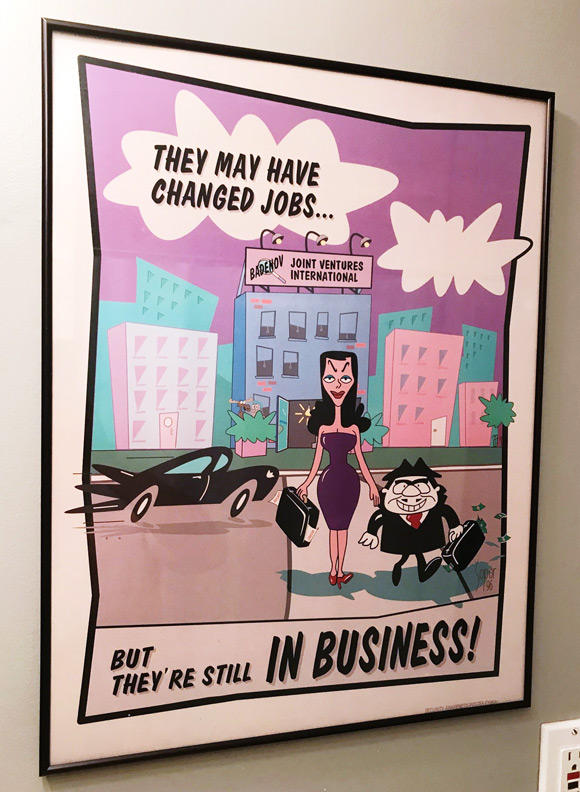
NSA Security Awareness Posters

From a FOIA request, over a hundred old NSA security awareness posters. Here are the BBC’s favorites. Here are Motherboard’s favorites.

I have a related personal story. Back in 1993, during the first Crypto Wars, I and a handful of other academic cryptographers visited the NSA for some meeting or another. These sorts of security awareness posters were everywhere, but there was one I especially liked—and I asked for a copy. I have no idea who, but someone at the NSA mailed it to me. It’s currently framed and on my wall.

I’ll bet that the NSA didn’t get permission from Jay Ward Productions.

Tell me your favorite in the comments.

Posted on January 31, 2020 at 1:36 PMView Comments

Bad Consumer Security Advice

There are lots of articles about there telling people how to better secure their computers and online accounts. While I agree with some of it, this article contains some particularly bad advice:

1. Never, ever, ever use public (unsecured) Wi-Fi such as the Wi-Fi in a café, hotel or airport. To remain anonymous and secure on the Internet, invest in a Virtual Private Network account, but remember, the bad guys are very smart, so by the time this column runs, they may have figured out a way to hack into a VPN.

I get that unsecured Wi-Fi is a risk, but does anyone actually follow this advice? I think twice about accessing my online bank account from a pubic Wi-Fi network, and I do use a VPN regularly. But I can’t imagine offering this as advice to the general public.

2. If you or someone you know is 18 or older, you need to create a Social Security online account. Today! Go to www.SSA.gov.

This is actually good advice. Brian Krebs calls it planting a flag, and it’s basically claiming your own identity before some fraudster does it for you. But why limit it to the Social Security Administration? Do it for the IRS and the USPS. And while you’re at it, do it for your mobile phone provider and your Internet service provider.

3. Add multifactor verifications to ALL online accounts offering this additional layer of protection, including mobile and cable accounts. (Note: Have the codes sent to your email, as SIM card “swapping” is becoming a huge, and thus far unstoppable, security problem.)

Yes. Two-factor authentication is important, and I use it on some of my more important online accounts. But I don’t have it installed on everything. And I’m not sure why having the codes sent to your e-mail helps defend against SIM-card swapping; I’m sure you get your e-mail on your phone like everyone else. (Here’s some better advice about that.)

4. Create hard-to-crack 12-character passwords. NOT your mother’s maiden name, not the last four digits of your Social Security number, not your birthday and not your address. Whenever possible, use a “pass-phrase” as your answer to account security questions ­ such as “Youllneverguessmybrotherinlawsmiddlename.”

I’m a big fan of random impossible-to-remember passwords, and nonsense answers to secret questions. It would be great if she suggested a password manager to remember them all.

5. Avoid the temptation to use the same user name and password for every account. Whenever possible, change your passwords every six months.

Yes to the first part. No, no no—a thousand times no—to the second.

6. To prevent “new account fraud” (i.e., someone trying to open an account using your date of birth and Social Security number), place a security freeze on all three national credit bureaus (Equifax, Experian and TransUnion). There is no charge for this service.

I am a fan of security freezes.

7. Never plug your devices (mobile phone, tablet and/or laptop) into an electrical outlet in an airport. Doing so will make you more susceptible to being hacked. Instead, travel with an external battery charger to keep your devices charged.

Seriously? Yes, I’ve read the articles about hacked charging stations, but I wouldn’t think twice about using a wall jack at an airport. If you’re really worried, buy a USB condom.

Posted on December 4, 2018 at 6:28 AMView Comments

The US Is Unprepared for Election-Related Hacking in 2018

This survey and report is not surprising:

The survey of nearly forty Republican and Democratic campaign operatives, administered through November and December 2017, revealed that American political campaign staff—primarily working at the state and congressional levels—are not only unprepared for possible cyber attacks, but remain generally unconcerned about the threat. The survey sample was relatively small, but nevertheless the survey provides a first look at how campaign managers and staff are responding to the threat.

The overwhelming majority of those surveyed do not want to devote campaign resources to cybersecurity or to hire personnel to address cybersecurity issues. Even though campaign managers recognize there is a high probability that campaign and personal emails are at risk of being hacked, they are more concerned about fundraising and press coverage than they are about cybersecurity. Less than half of those surveyed said they had taken steps to make their data secure and most were unsure if they wanted to spend any money on this protection.

Security is never something we actually want. Security is something we need in order to avoid what we don’t want. It’s also more abstract, concerned with hypothetical future possibilities. Of course it’s lower on the priorities list than fundraising and press coverage. They’re more tangible, and they’re more immediate.

This is all to the attackers’ advantage.

Posted on May 8, 2018 at 9:07 AMView Comments

1 2 3 5

Sidebar photo of Bruce Schneier by Joe MacInnis.