Entries Tagged "consumerization"

Page 2 of 2

Is Antivirus Dead?

This essay previously appeared in Information Security Magazine, as the second half of a point-counterpoint with Marcus Ranum. You can read his half here as well.

Security is never black and white. If someone asks, “for best security, should I do A or B?” the answer almost invariably is both. But security is always a trade-off. Often it’s impossible to do both A and B—there’s no time to do both, it’s too expensive to do both, or whatever—and you have to choose. In that case, you look at A and B and you make you best choice. But it’s almost always more secure to do both.

Yes, antivirus programs have been getting less effective as new viruses are more frequent and existing viruses mutate faster. Yes, antivirus companies are forever playing catch-up, trying to create signatures for new viruses. Yes, signature-based antivirus software won’t protect you when a virus is new, before the signature is added to the detection program. Antivirus is by no means a panacea.

On the other hand, an antivirus program with up-to-date signatures will protect you from a lot of threats. It’ll protect you against viruses, against spyware, against Trojans—against all sorts of malware. It’ll run in the background, automatically, and you won’t notice any performance degradation at all. And—here’s the best part—it can be free. AVG won’t cost you a penny. To me, this is an easy trade-off, certainly for the average computer user who clicks on attachments he probably shouldn’t click on, downloads things he probably shouldn’t download, and doesn’t understand the finer workings of Windows Personal Firewall.

Certainly security would be improved if people used whitelisting programs such as Bit9 Parity and Savant Protection—and I personally recommend Malwarebytes’ Anti-Malware—but a lot of users are going to have trouble with this. The average user will probably just swat away the “you’re trying to run a program not on your whitelist” warning message or—even worse—wonder why his computer is broken when he tries to run a new piece of software. The average corporate IT department doesn’t have a good idea of what software is running on all the computers within the corporation, and doesn’t want the administrative overhead of managing all the change requests. And whitelists aren’t a panacea, either: they don’t defend against malware that attaches itself to data files (think Word macro viruses), for example.

One of the newest trends in IT is consumerization, and if you don’t already know about it, you soon will. It’s the idea that new technologies, the cool stuff people want, will become available for the consumer market before they become available for the business market. What it means to business is that people—employees, customers, partners—will access business networks from wherever they happen to be, with whatever hardware and software they have. Maybe it’ll be the computer you gave them when you hired them. Maybe it’ll be their home computer, the one their kids use. Maybe it’ll be their cell phone or PDA, or a computer in a hotel’s business center. Your business will have no way to know what they’re using, and—more importantly—you’ll have no control.

In this kind of environment, computers are going to connect to each other without a whole lot of trust between them. Untrusted computers are going to connect to untrusted networks. Trusted computers are going to connect to untrusted networks. The whole idea of “safe computing” is going to take on a whole new meaning—every man for himself. A corporate network is going to need a simple, dumb, signature-based antivirus product at the gateway of its network. And a user is going to need a similar program to protect his computer.

Bottom line: antivirus software is neither necessary nor sufficient for security, but it’s still a good idea. It’s not a panacea that magically makes you safe, nor is it is obsolete in the face of current threats. As countermeasures go, it’s cheap, it’s easy, and it’s effective. I haven’t dumped my antivirus program, and I have no intention of doing so anytime soon.
Posted on November 10, 2009 at 6:31 AMView Comments

Nonsecurity Considerations in Security Decisions

Security decisions are generally made for nonsecurity reasons. For security professionals and technologists, this can be a hard lesson. We like to think that security is vitally important. But anyone who has tried to convince the sales VP to give up her department’s Blackberries or the CFO to stop sharing his password with his secretary knows security is often viewed as a minor consideration in a larger decision. This issue’s articles on managing organizational security make this point clear.

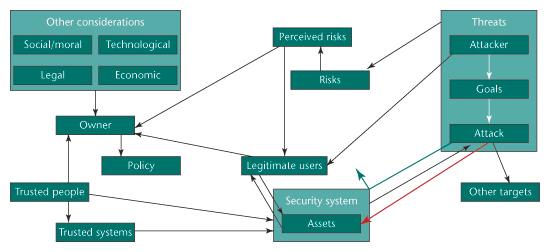
Below is a diagram of a security decision. At its core are assets, which a security system protects. Security can fail in two ways: either attackers can successfully bypass it, or it can mistakenly block legitimate users. There are, of course, more users than attackers, so the second kind of failure is often more important. There’s also a feedback mechanism with respect to security countermeasures: both users and attackers learn about the security and its failings. Sometimes they learn how to bypass security, and sometimes they learn not to bother with the asset at all.

Threats are complicated: attackers have certain goals, and they implement specific attacks to achieve them. Attackers can be legitimate users of assets, as well (imagine a terrorist who needs to travel by air, but eventually wants to blow up a plane). And a perfectly reasonable outcome of defense is attack diversion: the attacker goes after someone else’s asset instead.

Asset owners control the security system, but not directly. They implement security through some sort of policy—either formal or informal—that some combination of trusted people and trusted systems carries out. Owners are affected by risks … but really, only by perceived risks. They’re also affected by a host of other considerations, including those legitimate users mentioned previously, and the trusted people needed to implement the security policy.

Looking over the diagram, it’s obvious that the effectiveness of security is only a minor consideration in an asset owner’s security decision. And that’s how it should be.

Whether a security countermeasure repels or allows attacks (green and red arrows, respectively) is just a small consideration when making a security trade-off.

This essay originally appeared in IEEE Security and Privacy.

Posted on June 7, 2007 at 11:25 AMView Comments

Insider Threat Statistics

From Europe, although I doubt it’s any different in the U.S.:

  • One in five workers (21%) let family and friends use company laptops and PCs to access the Internet.
  • More than half (51%) connect their own devices or gadgets to their work PC.
  • A quarter of these do so every day.
  • Around 60% admit to storing personal content on their work PC.
  • One in ten confessed to downloading content at work they shouldn’t.
  • Two thirds (62%) admitted they have a very limited knowledge of IT Security.
  • More than half (51%) had no idea how to update the anti-virus protection on their company PC.
  • Five percent say they have accessed areas of their IT system they shouldn’t have.

One caveat: the study is from McAfee, and as the article rightly notes:

Naturally McAfee has a vested interest in talking up this kind of threat….

And finally:

Based on its survey, McAfee has identified four types of employees who put their workplace at risk:

  • The Security Softie – This group comprises the vast majority of employees. They have a very limited knowledge of security and put their business at risk through using their work computer at home or letting family members surf the Internet on their work PC.
  • The Gadget Geek – Those that come to work armed with a variety of devices/gadgets, all of which get plugged into their PC.
  • The Squatter – Those who use the company IT resources in ways they shouldn’t (i.e. by storing content or playing games).
  • The Saboteur – A very small minority of employees. This group will maliciously hack into areas of the IT system to which they shouldn’t have access or infect the network purposely from within

I like the list.

Posted on December 19, 2005 at 7:13 AMView Comments

Sidebar photo of Bruce Schneier by Joe MacInnis.