December 15, 2009
by Bruce Schneier
Chief Security Technology Officer, BT
schneier@schneier.com
http://www.schneier.com
A free monthly newsletter providing summaries, analyses, insights, and commentaries on security: computer and otherwise.
For back issues, or to subscribe, visit <http://www.schneier.com/crypto-gram.html>.
You can read this issue on the web at <http://www.schneier.com/crypto-gram-0912.html>. These same essays appear in the “Schneier on Security” blog: <http://www.schneier.com/>. An RSS feed is available.
In this issue:
- Terrorists Targeting High-Profile Events
- Eric Schmidt on Privacy
- News
- A Taxonomy of Social Networking Data
- The Psychology of Being Scammed
- Schneier News
- Reacting to Security Vulnerabilities
Terrorists Targeting High-Profile Events
In an AP story on increased security at major football (the American variety) events, this sentence struck me: “‘High-profile events are something that terrorist groups would love to interrupt somehow,’ said Anthony Mangione, chief of U.S. Immigration and Customs Enforcement’s Miami office.”
This is certainly the conventional wisdom, but is there any actual evidence that it’s true? The 9/11 terrorists could have easily chosen a different date and a major event—sporting or other—to target, but they didn’t. The London and Madrid train bombers could have just as easily chosen more high-profile events to bomb, but they didn’t. The Mumbai terrorists chose an ordinary day and ordinary targets. Aum Shinrikyo chose an ordinary day and ordinary train lines. Timothy McVeigh chose the ordinary Oklahoma City Federal Building. Irish terrorists chose, and Palestinian terrorists continue to choose, ordinary targets. Some of this can be attributed to the fact that ordinary targets are easier targets, but not a lot of it.
The only examples that come to mind of terrorists choosing high-profile events or targets are the idiot wannabe terrorists who would have been incapable of doing anything unless egged on by a government informant. Hardly convincing evidence.
Yes, I’ve seen the movie Black Sunday. But is there any reason to believe that terrorists want to target these sorts of events other than us projecting our own fears and prejudices onto the terrorists’ motives?
AP story:
http://www.huffingtonpost.com/2009/12/03/…
Idiot wannabe terrorists:
http://www.schneier.com/essay-174.html
I wrote about protecting the World Series some years ago.
http://www.schneier.com/essay-065.html
Eric Schmidt on Privacy
Schmidt said:
I think judgment matters. If you have something that you don’t
want anyone to know, maybe you shouldn’t be doing it in the first
place. If you really need that kind of privacy, the reality is
that search engines—including Google—do retain this
information for some time and it’s important, for example, that we
are all subject in the United States to the Patriot Act and it is
possible that all that information could be made available to the
authorities.
This, from 2006, is my response:
Privacy protects us from abuses by those in power, even if we’re
doing nothing wrong at the time of surveillance.
We do nothing wrong when we make love or go to the bathroom. We
are not deliberately hiding anything when we seek out private
places for reflection or conversation. We keep private journals,
sing in the privacy of the shower, and write letters to secret
lovers and then burn them. Privacy is a basic human need.
[…]
For if we are observed in all matters, we are constantly under
threat of correction, judgment, criticism, even plagiarism of our
own uniqueness. We become children, fettered under watchful eyes,
constantly fearful that—either now or in the uncertain future
—patterns we leave behind will be brought back to implicate us,
by whatever authority has now become focused upon our once-private
and innocent acts. We lose our individuality, because everything
we do is observable and recordable.
[…]
This is the loss of freedom we face when our privacy is taken from
us. This is life in former East Germany, or life in Saddam
Hussein’s Iraq. And it’s our future as we allow an ever-intrusive
eye into our personal, private lives.
Too many wrongly characterize the debate as “security versus
privacy.” The real choice is liberty versus control. Tyranny,
whether it arises under threat of foreign physical attack or under
constant domestic authoritative scrutiny, is still tyranny.
Liberty requires security without intrusion, security plus
privacy. Widespread police surveillance is the very definition of
a police state. And that’s why we should champion privacy even
when we have nothing to hide.
Schmidt’s remarks:
http://gawker.com/5419271/…
My essay on the value of privacy:
http://www.schneier.com/essay-114.html
See also Daniel Solove’s “‘I’ve Got Nothing to Hide’ and Other Misunderstandings of Privacy.”
http://papers.ssrn.com/sol3/papers.cfm?…
News
Interesting research on public reactions to terrorist threats. Not that it’s surprising: Fear makes people deferential, docile, and distrustful, and both politicians and marketers have learned to take advantage of this.
https://www.schneier.com/blog/archives/2009/11/…
Jennifer Merolla and Elizabeth Zechmeister have written a book, Democracy at Risk: How Terrorist Threats Affect the Public. I haven’t read it yet.
http://www.amazon.com/gp/product/0226520552/…
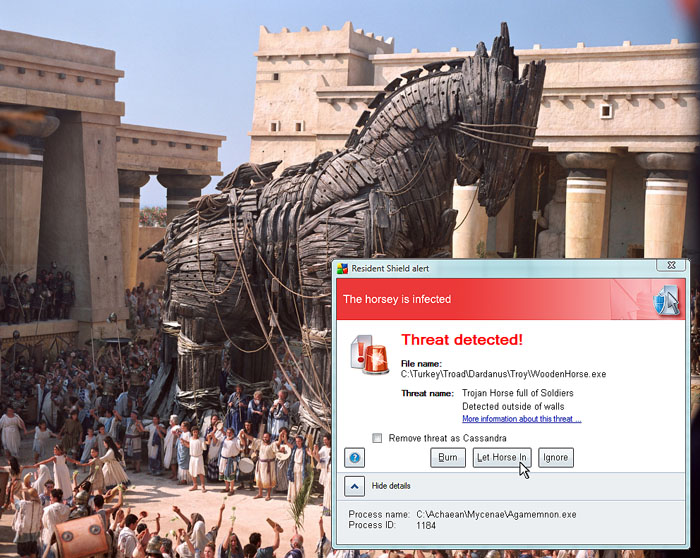
Funny image: anti-malware detection and the original Trojan Horse.
http://www.sampsonuk.net/B3TA/TrojanHorse.jpg
A study in the British Journal of Criminology makes the point that drink-spiking date-raping is basically an urban legend. The hypothesis is that perpetuating the fear of drug-based rape allows parents and friends to warn young women off excessive drinking without criticizing their personal choices. The fake bogeyman lets people avoid talking about the real issues.
https://www.schneier.com/blog/archives/2009/11/…
Door locks that open if you tap a particular rhythm.
http://www.engadget.com/2009/11/04/…
http://spritesmods.com/?art=knock2open
http://www.taplock.com/
Neat research in “quantum ghost imaging.” Despite its name, it has nothing to do with quantum mechanics; it’s a way to use a camera and a light source to produce images of objects that the camera cannot see.
http://www.newscientist.com/article/dn13825
http://www.globalsecurity.org/military/library/news/…
http://arxiv1.library.cornell.edu/PS_cache/arxiv/…
How smart are Islamic terrorists? According to “Organizational Learning and Islamic Militancy,” written by Michael Kenney for the U.S. Department of Justice in May, not very.
https://www.schneier.com/blog/archives/2009/11/…
Research on stabbing people with stuff you can get through airport security.
http://www.ncbi.nlm.nih.gov/pubmed/17325460?…
Denial-of-service attacks against CALEA:
https://www.schneier.com/blog/archives/2009/11/…
Funny: career fair fail.
http://failblog.org/2009/11/07/career-fair-fail/
See the caption on the original photo for the real story.
http://www.flickr.com/photos/paperghost/776598575/…
Al Qaeda secret code broken: maybe this is a real story, and maybe not.
https://www.schneier.com/blog/archives/2009/11/…
Decertifying “terrorist” pilots:
https://www.schneier.com/blog/archives/2009/11/…
Norbt (no robot) is a low-security web application to encrypt web pages. You can create and encrypt a webpage. The key is an answer to a question; anyone who knows the answer can see the page. I’m not sure this is very useful.
https://norbt.com/
This paper, on users rationally rejecting security advice, by Cormac Herley at Microsoft Research, sounds like me:
http://research.microsoft.com/en-us/um/people/…
Related article on usable security:
http://cacm.acm.org/magazines/2009/11/…
If you allow players in an online world to penalize each other, you open the door to extortion.
https://www.schneier.com/blog/archives/2009/11/…
Long, detailed, and very good story of the Mumbai terrorist attacks of last year.
http://www.vqronline.org/webexclusive/2009/11/19/…
My own short commentary in the aftermath of the attacks.
https://www.schneier.com/blog/archives/2008/12/…
Wikileaks has published pager intercepts from New York on 9/11. It’s disturbing to realize that someone, possibly not even a government, was routinely intercepting most (all?) of the pager data in lower Manhattan as far back as 2001. Who was doing it? For that purpose? That, we don’t know.
https://www.schneier.com/blog/archives/2009/11/…
This 1996 interview with psychiatrist Robert DuPont was part of a Frontline program called “Nuclear Reaction.” He’s talking about the role fear plays in the perception of nuclear power. It’s a lot of the sorts of things I say, but particularly interesting is his comments on familiarity and how it reduces fear.
http://www.pbs.org/wgbh/pages/frontline/shows/…
So, among other reasons, terrorism is scary because it’s so rare. When it’s more common—England during the Troubles, Israel today—people have a more rational reaction to it.
https://www.schneier.com/blog/archives/2009/11/…
Long blog post of mine on cyberwarfare policy; lots of links.
https://www.schneier.com/blog/archives/2009/12/…
This research centers on looking at the radio characteristics of individual RFID chips and creating a “fingerprint.” It makes sense; fingerprinting individual radios based on their transmission characteristics is as old as WW II. But while the research centers on using this as an anti-counterfeiting measure, I think it would much more likely be used as an identification and surveillance tool. Even if the communication is fully encrypted, this technology could be used to uniquely identify the chip.
http://dailyheadlines.uark.edu/16260.htm
With Windows Volume Shadow Copy, it can be impossibly to securely delete a file.
http://.szynalski.com/2009/11/23/…
Sprint provides U.S. law enforcement with cell phone customer location data:
https://www.schneier.com/blog/archives/2009/12/…
Using fake documents to get a valid U.S. passport:
https://www.schneier.com/blog/archives/2009/12/…
No credential can be more secure than its breeder documents and issuance procedures.
Article on “Emotional epidemiology” from the New England Journal of Medicine. It sounds familiar.
https://www.schneier.com/blog/archives/2009/12/…
The TSA accidentally published its standard operating procedures:
https://www.schneier.com/blog/archives/2009/12/…
It might have compromised an intelligence program:
http://politics.theatlantic.com/2009/12/…
No real news on Obama’s cybersecurity czar:
https://www.schneier.com/blog/archives/2009/12/…
For the record—as the rumors circulate occasionally—I don’t want the job.
Wondermark on passwords:
http://wondermark.com/576/
U.S./Russia cyber arms control talks:
https://www.schneier.com/blog/archives/2009/12/…
A Taxonomy of Social Networking Data
At the Internet Governance Forum in Sharm El Sheikh this week, there was a conversation on social networking data. Someone made the point that there are several different types of data, and it would be useful to separate them. This is my taxonomy of social networking data.
1. Service data. Service data is the data you need to give to a social networking site in order to use it. It might include your legal name, your age, and your credit card number.
2. Disclosed data. This is what you post on your own pages: blog entries, photographs, messages, comments, and so on.
3. Entrusted data. This is what you post on other people’s pages. It’s basically the same stuff as disclosed data, but the difference is that you don’t have control over the data—someone else does.
4. Incidental data. Incidental data is data the other people post about you. Again, it’s basically the same stuff as disclosed data, but the difference is that 1) you don’t have control over it, and 2) you didn’t create it in the first place.
5. Behavioral data. This is data that the site collects about your habits by recording what you do and who you do it with.
Different social networking sites give users different rights for each data type. Some are always private, some can be made private, and some are always public. Some can be edited or deleted—I know one site that allows entrusted data to be edited or deleted within a 24-hour period—and some cannot. Some can be viewed and some cannot.
And people *should* have different rights with respect to each data type. It’s clear that people should be allowed to change and delete their disclosed data. It’s less clear what rights they have for their entrusted data. And far less clear for their incidental data. If you post pictures of a party with me in them, can I demand you remove those pictures—or at least blur out my face? And what about behavioral data? It’s often a critical part of a social networking site’s business model. We often don’t mind if they use it to target advertisements, but are probably less sanguine about them selling it to third parties.
As we continue our conversations about what sorts of fundamental rights people have with respect to their data, this taxonomy will be useful.
Lots of discussion at the blog entry:
https://www.schneier.com/blog/archives/2009/11/…
Another categorization centered on destination instead of trust level:
http://mechpoe.blogspot.com/2009/11/…
The Psychology of Being Scammed
This is a very interesting paper: “Understanding scam victims: seven principles for systems security, by Frank Stajano and Paul Wilson.” Paul Wilson produces and stars in the British television show The Real Hustle, which does hidden camera demonstrations of con games. (There’s no DVD of the show available, but there are bits of it on YouTube.) Frank Stajano is at the Computer Laboratory of the University of Cambridge.
The paper describes a dozen different con scenarios—entertaining in itself—and then lists and explains six general psychological principles that con artists use:
1. The distraction principle. While you are distracted by what retains your interest, hustlers can do anything to you and you won’t notice.
2. The social compliance principle. Society trains people not to question authority. Hustlers exploit this “suspension of suspiciousness” to make you do what they want.
3. The herd principle. Even suspicious marks will let their guard down when everyone next to them appears to share the same risks. Safety in numbers? Not if they’re all conspiring against you.
4. The dishonesty principle. Anything illegal you do will be used against you by the fraudster, making it harder for you to seek help once you realize you’ve been had.
5. The deception principle. Things and people are not what they seem. Hustlers know how to manipulate you to make you believe that they are.
6. The need and greed principle. Your needs and desires make you vulnerable. Once hustlers know what you really want, they can easily manipulate you.
It all makes for very good reading.
The paper:
http://www.cl.cam.ac.uk/techreports/UCAM-CL-TR-754.html
The Real Hustle:
http://www.imdb.com/title/tt0791615/
Two previous posts on the psychology of conning and being conned.
https://www.schneier.com/blog/archives/2009/06/…
https://www.schneier.com/blog/archives/2008/10/…
Schneier News
Interview with me conducted in Rotterdam in October.
http://risky.biz/RB2-schneier
Interview with me from Gulf News:
http://gulfnews.com/business/technology/…
Video of the talk on “The Future of Privacy” that I gave to the Open Rights Group in early December:
http://www.openrightsgroup.org//2009/…
Reacting to Security Vulnerabilities
Last month, researchers found a security flaw in the SSL protocol, which is used to protect sensitive web data. The protocol is used for online commerce, webmail, and social networking sites. Basically, hackers could hijack an SSL session and execute commands without the knowledge of either the client or the server. The list of affected products is enormous.
If this sounds serious to you, you’re right. It is serious. Given that, what should you do now? Should you not use SSL until it’s fixed, and only pay for internet purchases over the phone? Should you download some kind of protection? Should you take some other remedial action? What?
If you read the IT press regularly, you’ll see this sort of question again and again. The answer for this particular vulnerability, as for pretty much any other vulnerability you read about, is the same: do nothing. That’s right, nothing. Don’t panic. Don’t change your behavior. Ignore the problem, and let the vendors figure it out.
There are several reasons for this. One, it’s hard to figure out which vulnerabilities are serious and which are not. Vulnerabilities such as this happen multiple times a month. They affect different software, different operating systems, and different web protocols. The press either mentions them or not, somewhat randomly; just because it’s in the news doesn’t mean it’s serious.
Two, it’s hard to figure out if there’s anything you can do. Many vulnerabilities affect operating systems or Internet protocols. The only sure fix would be to avoid using your computer. Some vulnerabilities have surprising consequences. The SSL vulnerability mentioned above could be used to hack Twitter. Did you expect that? I sure didn’t.
Three, the odds of a particular vulnerability affecting you are small. There are a lot of fish in the Internet, and you’re just one of billions.
Four, often you can’t do anything. These vulnerabilities affect clients and servers, individuals and corporations. A lot of your data isn’t under your direct control—it’s on your web-based email servers, in some corporate database, or in a cloud computing application. If a vulnerability affects the computers running Facebook, for example, your data is at risk, whether you log in to Facebook or not.
It’s much smarter to have a reasonable set of default security practices and continue doing them. This includes:
1. Install an antivirus program if you run Windows, and configure it to update daily. It doesn’t matter which one you use; they’re all about the same. For Windows, I like the free version of AVG Internet Security. Apple Mac and Linux users can ignore this, as virus writers target the operating system with the largest market share.
2. Configure your OS and network router properly. Microsoft’s operating systems come with a lot of security enabled by default; this is good. But have someone who knows what they’re doing check the configuration of your router, too.
3. Turn on automatic software updates. This is the mechanism by which your software patches itself in the background, without you having to do anything. Make sure it’s turned on for your computer, OS, security software, and any applications that have the option. Yes, you have to do it for everything, as they often have separate mechanisms.
4. Show common sense regarding the Internet. This might be the hardest thing, and the most important. Know when an email is real, and when you shouldn’t click on the link. Know when a website is suspicious. Know when something is amiss.
5. Perform regular backups. This is vital. If you’re infected with something, you may have to reinstall your operating system and applications. Good backups ensure you don’t lose your data—documents, photographs, music—if that becomes necessary.
That’s basically it. I could give a longer list of safe computing practices, but this short one is likely to keep you safe. After that, trust the vendors. They spent all last month scrambling to fix the SSL vulnerability, and they’ll spend all this month scrambling to fix whatever new vulnerabilities are discovered. Let that be their problem.
SSL flaw:
http://www.eweekeurope.co.uk/news/…
http://www.linuxtoday.com/news_story.php3?…
http://isc.sans.org/diary.html?storyid=7534
http://searchsecurity.techtarget.com/news/article/…
http://www.tombom.co.uk/blog/?p=85
http://www.securityfocus.com/bid/36935/info
SSL flaw used to hack Twitter:
http://www.techworld.com.au/article/326496/…
http://www.eweek.com/c/a/Security/…
AVG Anti-virus:
http://lifehacker.com/5401255/…
My 2004 article on safe personal computing:
https://www.schneier.com/blog/archives/2004/12/…
Since 1998, CRYPTO-GRAM has been a free monthly newsletter providing summaries, analyses, insights, and commentaries on security: computer and otherwise. You can subscribe, unsubscribe, or change your address on the Web at <http://www.schneier.com/crypto-gram.html>. Back issues are also available at that URL.
Please feel free to forward CRYPTO-GRAM, in whole or in part, to colleagues and friends who will find it valuable. Permission is also granted to reprint CRYPTO-GRAM, as long as it is reprinted in its entirety.
CRYPTO-GRAM is written by Bruce Schneier. Schneier is the author of the best sellers “Schneier on Security,” “Beyond Fear,” “Secrets and Lies,” and “Applied Cryptography,” and an inventor of the Blowfish, Twofish, Threefish, Helix, Phelix, and Skein algorithms. He is the Chief Security Technology Officer of BT BCSG, and is on the Board of Directors of the Electronic Privacy Information Center (EPIC). He is a frequent writer and lecturer on security topics. See <http://www.schneier.com>.
Crypto-Gram is a personal newsletter. Opinions expressed are not necessarily those of BT.
Copyright (c) 2009 by Bruce Schneier.